
Why Adobe Fresco Is Gaining Ground
Fresco wasn’t built to be everything for everyone. It’s focused and that’s its strength. Designed from the ground up for illustrators and digital painters, it puts creative flow first. Whether you’re sketching ideas or finishing full page spreads, the app keeps the tools you actually use front and center.
What makes Fresco stand out is how it lets artists blend raster and vector workflows in a single space. You can sketch with pixel based brushes for texture, then add clean, scalable vector lines without switching apps. And then there are the live brushes watercolor and oil effects that move and blend like the real thing. Realism without the mess.
Since it’s part of Adobe’s ecosystem, syncing with Creative Cloud is seamless. Work on iPad, review on desktop, pick up wherever you left off. That kind of integration matters when you’re juggling client work or ideas on the go. Fresco doesn’t just compete it fits.
Key Features That Set It Apart
Adobe Fresco stands out by delivering both power and precision tailored to the needs of today’s digital illustrators. Here’s a breakdown of what makes it exceptional:
Live Brushes: Watercolor and Oil Effects That Feel Real
Fresco’s Live Brushes simulate traditional painting with stunning realism. Whether you’re blending delicate watercolors or working with thick oil textures, the brushes respond intuitively to pressure, tilt, and motion.
Watercolor bleeds and blends naturally
Oils build texture and depth like real paint
Designed for a tactile, responsive experience
Vector and Raster on One Canvas
One of Fresco’s most unique advantages is the ability to freely mix vector and raster artwork on the same canvas.
Draw clean, scalable lines with vector tools
Add rich, textured shading with raster brushes
Easily switch between both modes in a single workflow
This kind of flexibility boosts creativity and speeds up complex compositions.
Brush Importing and Customization
Already have a favorite set of brushes in Photoshop? Fresco supports importing them and more.
Use your existing Photoshop brushes seamlessly
Customize brush settings for size, flow, and behavior
Create and organize your own brush libraries
Tailor your tools to suit your personal style and project needs.
Cloud Sync for Seamless Access
Fresco’s tight integration with the Adobe Creative Cloud means your work is instantly accessible.
Start a sketch on your iPad, continue on your desktop
Files auto save to the cloud in real time
No need to worry about lost progress or broken workflows
This is especially beneficial for creators working across multiple devices.
Touch and Gesture Support for On the Go Creativity
Designed with mobile users in mind, Fresco offers intuitive touch gestures that keep your hands on workflow uninterrupted.
Pinch, zoom, and rotate directly on screen
Quick actions with finger shortcuts
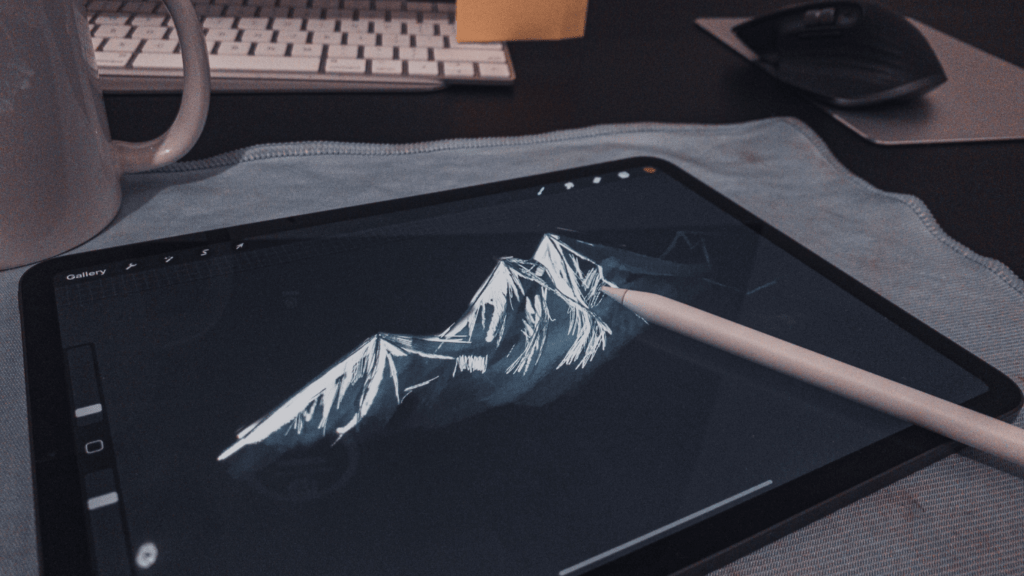
Optimized for stylus and touchscreen devices like the iPad Pro with Apple Pencil
Whether you’re sketching in studio or editing on the move, Fresco meets you wherever your workflow takes you.
Who It’s Best Suited For

Fresco isn’t a one size fits all app it’s purpose built for creatives who need versatility without bloated tools standing in the way.
For illustrators chasing that hand painted look, Fresco’s live brushes feel surprisingly close to the real thing. You get delicate edges, pressure sensitive blending, and watercolors that actually bleed across the canvas like pigment. The best part? No scanner needed. Just sketch and paint directly, no cleanup, no paper trails.
Designers who straddle the line between art and scale benefit most from the hybrid workflow. Fresco lets you layer vectors with textured brushes right on top ideal for everything from posters to packaging mockups. The result is artwork that feels warm and handmade, but still sharp enough for high res print.
And for animators? This app isn’t trying to replace heavyweight rigs but for frame by frame animation, it’s slick. Built in motion tools make it easy to block out keyframes, test ideas, and bring line work to life. Especially useful for concept passes or stylized loops.
Fresco makes sense when you care about feel, speed, and control without fiddling with ten different apps.
Newest Updates You Need To Know
Adobe Fresco’s latest round of updates make it clearer than ever: they’re targeting serious creators who want power without the wait. Performance on Apple’s M1 and M2 chips is now smoother, faster, and more efficient no more lag when you’re mid brushstroke. Everything from canvas navigation to brush responsiveness just feels tighter.
Exporting also got a noticeable bump in speed. Whether you’re moving over large files or prepping animations, you’ll spend less time waiting and more time making. It’s not flashy, but it’s the kind of update you feel the second you hit “render.”
The brush library’s seen a noticeable glow up too. Fresco has added new textures with more tactile realism, along with smart tweaks to existing live brushes. Oil brushes smear more convincingly, watercolors bleed better onto digital “paper.”
On the animation front, Fresco continues to push toward lightweight but capable. The built in tools got refined, making frame by frame motion smoother to execute and easier to tweak.
These aren’t headline updates they’re workflow wins. And if you’re using Fresco for steady creative output, they matter.
To see exactly what changed and what it means for pros, check out the full Adobe Fresco Update.
Real World Use Cases
Fresco wasn’t built for everyone it was built for creatives who sketch, paint, and design in ways that traditional apps just didn’t quite get. Nowhere is that more clear than in how it’s being used on the ground.
Take children’s book illustration. Fresco’s live brushes make it easier to mimic traditional textures, so you get the warmth and flow of watercolor without fighting with paper scans and touch ups. For illustrators crafting dreamy, expressive spreads, this saves hours without cutting quality.
In the world of concept art for games and film, speed matters. So does flexibility. Fresco’s vector raster combo makes for quick iterations without jumping between programs. Brush in broad ideas, switch to vector for clean details, and keep everything in one file. It’s streamlined enough for tight turnarounds, but still flexible for all the ideas you change last minute (because you will).
Branding work is getting more handmade again especially campaigns that want a human touch. Fresco’s hand drawn assets scale easily for packaging, social content, or web headers. Plus, its brushes give designers room to get playful with line variation and organic edges. The result: work that feels less “template” and more original.
Finally, storyboarding. Early animation phases thrive on iteration and fluidity. Fresco’s frame by frame tools make it easy to draft scene flows or mock up rough movement. It’s quick, it’s light and you can sketch without feeling boxed into frames too soon.
If you work in visual storytelling, Fresco’s not just a helper it’s a cockpit.
Final Thoughts on Workflow Value
Adobe Fresco isn’t trying to be everything but it nails what matters for illustrators who want to move fast without cutting corners. If you usually hop between apps just to finish a single piece, Fresco trims the fat. You can sketch, refine, add texture, animate all in one place. No exporting. No syncing headaches.
For stylus first creators, especially Apple Pencil users, the experience feels second nature. The pressure and tilt sensitivity actually respond like real tools. No clunky workarounds, just solid feel and flow.
And while it packs pro level output, the learning curve stays gentle. You don’t need 40 hours of tutorials to get moving. If you’ve drawn before, you’ll figure it out fast.
Bottom line: For creatives who want speed, quality, and fewer distractions, Fresco is worth a serious look. You get depth without the drag.
(Dig deeper into the latest tools with this Adobe Fresco Update)